
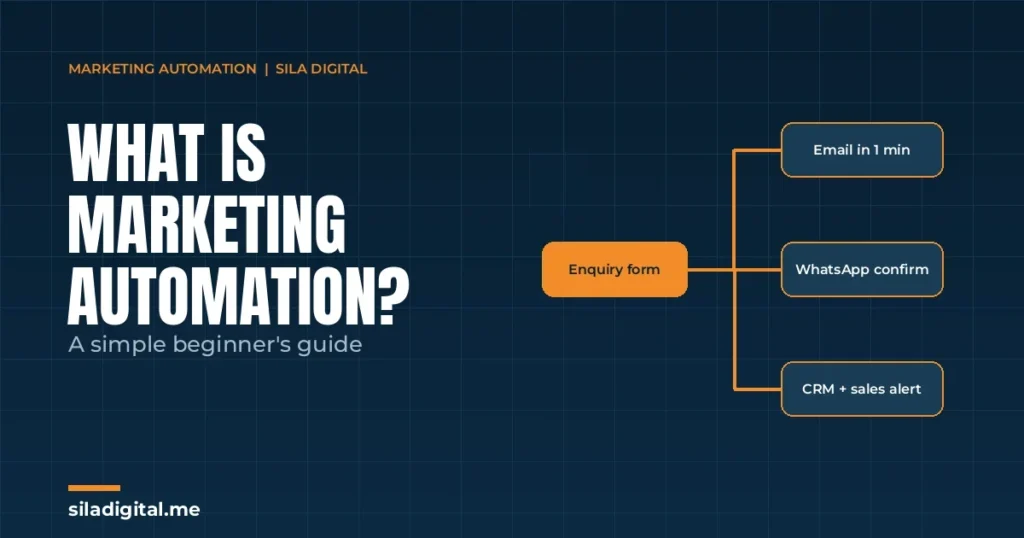
Most leads are not lost because someone said no. They are lost because nobody followed up in time, or followed up once and then forgot. Marketing automation exists to fix exactly that problem, and it is far less complicated than the name suggests.
This guide explains what marketing automation is, how it works, what it looks like in practice for businesses in the UAE and the wider GCC, which tools are involved, and where to start if you have never built a workflow before.
Marketing automation in one sentence
Marketing automation is a set of rules that send the right message to the right person at the right time, automatically, based on what that person does.
That is the whole idea. Someone fills in a form, downloads a guide, opens a demo account, abandons a basket or goes quiet for sixty days, and the system responds without a human having to notice and act. The “marketing” part is the message. The “automation” part is the logic that decides when it goes out and to whom.
For a growing business, the value is not that it saves an hour here and there. It is that the follow-up happens every single time, within minutes, at two in the morning and on public holidays, whether or not your team is busy.
How marketing automation works: triggers, conditions and actions
Every automation, from the simplest welcome email to a ninety-day nurture journey, is built from three parts.
-
- A trigger: the event that starts the workflow. A form submission, a new contact in your CRM, a page visit, a purchase, a date, or a lead score crossing a threshold.
-
- Conditions: the rules that decide what happens next. Is this contact in the UAE? Have they already spoken to sales? Did they open the last email? Is their account funded?
-
- Actions: what the system does. Send an email or WhatsApp message, assign the lead to a salesperson, add a tag, update a field, create a task in Asana, wait three days, or move the contact to a different list.
A workflow is simply a chain of these. Trigger, then a condition, then an action, then a wait, then another condition. Drawn on a whiteboard it looks like a flowchart, and that is exactly how most platforms let you build it.
| Building block | Plain English | Example |
|---|---|---|
| Trigger | Something happens | A visitor requests a property brochure |
| Condition | Check something | Is their budget field above a set amount? |
| Action | Do something | Send the brochure, notify the agent on WhatsApp, create a follow-up task |
| Wait | Pause | Wait two days |
| Branch | Go one of two ways | If they opened the brochure, send viewing slots; if not, send a reminder |
What marketing automation is not
A few misconceptions trip up beginners, so it is worth clearing them early.
-
- It is not a bulk email blast. Sending the same newsletter to everyone on a Tuesday is email marketing, not automation. Automation is triggered by behaviour and personalised by data.
-
- It is not a CRM, though it needs one. A CRM stores and tracks your contacts. Automation acts on them. Most platforms now combine both, but the two jobs are different.
-
- It is not set-and-forget. Workflows need reviewing as your offer, your team and your compliance requirements change. A journey built for last year’s product can quietly send the wrong message for months.
Five everyday examples of marketing automation
1. Lead follow-up within minutes
A prospect submits an enquiry on your website, often from a paid campaign. Within a minute they receive a personalised email confirming what happens next, the lead is created in your CRM with its source recorded, and the right salesperson gets a notification with the details. If nobody has logged a call within four hours, a reminder goes to the sales manager. This single workflow recovers more revenue than almost any other, because speed to first contact is one of the strongest predictors of whether a lead converts.
2. Welcome and onboarding sequences
A new subscriber, new client or new account holder receives a short series of messages over their first two weeks: what to expect, how to get value quickly, who to contact, and one clear next step. Good onboarding reduces early churn and support tickets.
3. Lead scoring and sales handoff
Every action a contact takes adds or removes points: visiting the pricing page, opening three emails, downloading a guide, or going silent for a month. When a contact crosses a threshold, they are handed to sales automatically, and sales spends its time on the warmest contacts instead of guessing.
4. Abandoned basket, abandoned application and re-engagement
An e-commerce shopper leaves items in their basket; a trader starts an account application and stops at document upload; a mortgage enquiry goes cold after the first call. Each of these is a trigger for a short, well-timed sequence that brings the person back to where they left off.
5. Long-cycle nurture for high-ticket decisions
Some decisions take months. A high-value financial services client may need ninety days of useful, relevant contact before they commit. Automation keeps that relationship warm with educational content, case studies and timely check-ins, so the prospect hears from you consistently without a salesperson having to remember.
What it looks like in your industry
Financial services, wealth management and FX/CFD brokers
Consultation and callback requests routed to the right adviser or account manager by product, language and location. Demo-to-live journeys for brokers that respond to actual trading activity, KYC and document-collection reminders for applications that stall, education sequences for new clients, quarterly review scheduling, and re-engagement for dormant accounts. Because this is a regulated space, every automated message should go through the same compliance review as any other marketing communication, with pre-approved, version-controlled templates, and the workflow should respect the jurisdictions you are licensed to market in.
E-commerce
Welcome flows with a first-order incentive, abandoned basket and browse-abandonment sequences, post-purchase cross-sell based on what was bought, replenishment reminders for consumables, and win-back campaigns for lapsed customers. These flows run without anyone pressing send.
Real estate
Instant response to a new property enquiry, often the difference between winning and losing the viewing, agent assignment by area and budget, brochure delivery, viewing reminders, and a long nurture for investors watching the market.
Clinics and healthcare
Dubai has one of the most competitive private healthcare markets in the region, and most clinics still handle enquiries by phone during opening hours. Automation books the consultation from a web or Instagram enquiry, confirms it on WhatsApp, sends reminders that cut no-shows, follows up after the visit with aftercare and a review request, and prompts recalls for follow-up appointments and annual check-ups. Patient data must be handled in line with UAE health data regulations, so consent and data storage are part of the design from the start.
Which tools are involved
Beginners often start by asking which platform to buy. It is the wrong first question, but it helps to understand the categories, because a working system usually combines several of them.
-
- CRM and all-in-one automation platforms store contacts, score leads and run workflows in one place. HubSpot, Zoho, ActiveCampaign and Salesforce are common choices for service businesses with a sales team.
-
- Email and SMS automation tools such as Klaviyo, Brevo and Mailchimp, with Klaviyo built specifically around e-commerce data.
-
- WhatsApp Business Platform for confirmations, reminders and two-way conversations on the channel most UAE customers actually read, connected to your CRM so every message is logged.
-
- Meta Business Suite and ad platform integrations so leads from Instagram and Facebook lead forms land in your CRM instantly instead of sitting in a download.
-
- Connectors such as Make or Zapier, which link tools that do not natively talk to each other: a website form creating a CRM record, notifying a channel and updating a sheet in one flow.
-
- Scheduling, forms and chat tools like Calendly, Typeform and website chat widgets, which are often the trigger for everything downstream.
-
- Analytics such as GA4 and your CRM’s own reporting, where you confirm that the leads your workflows produce came from the channels you think they did.
The right combination depends on your size, your sales process and the systems you already run. We recommend based on the business in front of us, not a house favourite, and most problems blamed on a tool are really problems with the workflow design or the data going in.
What to automate first
Start with the leak, not the wishlist. Map your customer journey from first click to closed deal and ask one question at each stage: where do leads go quiet, and who is supposed to be chasing them? That point is your first workflow.
For most businesses it is one of two things:
-
- Lead follow-up, because the gap between enquiry and first human contact is where the most money is lost.
-
- A welcome sequence, because new contacts are at their most attentive in the first few days and most businesses send nothing.
Build one, measure it for thirty days, fix what the data tells you, then add the next. A single workflow that runs reliably is worth more than ten that were launched together and never reviewed.
Common beginner mistakes
-
- Automating before the data is clean. Duplicate contacts, empty fields and inconsistent tags produce embarrassing messages. Clean the CRM first.
-
- Over-messaging. Five emails in a week will cost you more unsubscribes than it wins in sales. Space messages out and let behaviour, not a calendar, drive the next one.
-
- No exit conditions. A prospect who has already bought should leave the nurture journey immediately. Every workflow needs rules for who comes out, not just who goes in.
-
- Forgetting compliance and consent. Particularly in financial services and FX, automated messages are still marketing communications. Consent, opt-outs and jurisdiction rules apply to every send.
How to measure whether it is working
Judge automation on pipeline, not on open rates. The measures that matter most:
-
- Speed to lead: the time between an enquiry arriving and the first meaningful contact. Measure it in minutes.
-
- Lead-to-meeting rate: the share of new leads that reach a call, viewing or consultation.
-
- Workflow conversion: for each flow, how many people who entered it completed the goal it was built for.
-
- Pipeline and revenue influenced: deals that were touched by automation before closing, reported from your CRM.
-
- Unsubscribe and complaint rates: the early warning that a flow is too aggressive or badly targeted.
Give a new workflow at least thirty days before judging it (the same patience SEO needs, for different reasons), and a long-cycle nurture at least one full sales cycle. Then review it every quarter, because your business will have changed.
Designer note: the trigger-condition-action table and the five examples lend themselves to a simple flowchart graphic. See image briefs at the end of this document.
Frequently asked questions
What is marketing automation in simple terms?
It is a set of workflows that send the right message to the right person automatically, based on what they do. Instead of chasing every lead by hand, the system follows up for you, consistently and on time.
What is the difference between marketing automation and email marketing?
Email marketing is the campaigns you send to a list. Automation is the logic that triggers messages based on behaviour. Email is the message and automation is the engine, and they are strongest together.
Do I need a CRM for marketing automation?
In almost every case, yes. The CRM is where contacts are stored, scored and tracked, and automation acts on that data. If you do not have one, choosing and setting up the right fit is the first step.
Is marketing automation only for large companies?
No. Smaller teams often benefit most, because they have the least capacity for manual follow-up. A single well-built lead follow-up workflow can run for a business of any size.
Can marketing automation work with WhatsApp in the UAE?
Yes. WhatsApp can be connected alongside email and your CRM so that enquiries, confirmations and reminders go out on the channel your customers actually read, subject to the platform’s business messaging rules and the customer’s consent.
Not sure where your leads are going quiet?
On a discovery call we will map your customer journey with you, find the point where the most opportunities are lost, and show you the first workflow that would recover them.